Beyond the Spec Sheet: A Professional’s Guide to Interpreting Thermal Imager Specifications

In the world of industrial maintenance, electrical diagnostics, and building science, the thermal imaging camera has evolved from a niche luxury to an indispensable diagnostic tool. Yet, selecting the right one can feel like navigating a minefield of technical jargon. You’re confronted with a barrage of specifications: infrared resolution, NETD, IFOV, fusion modes, and more. What do these numbers truly mean for your work in the field? How do you separate marketing hyperbole from mission-critical capability?
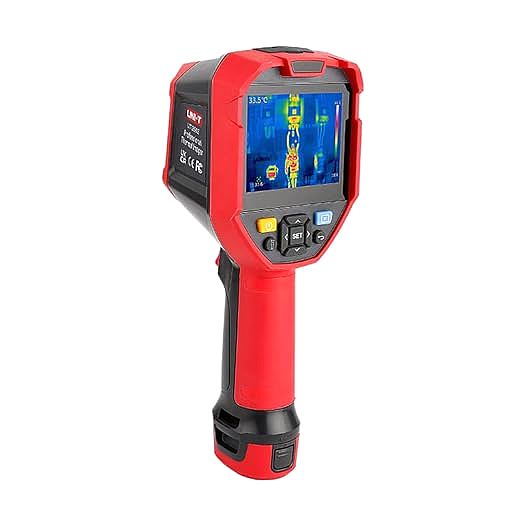
This guide aims to demystify these specifications. We will dissect the technical DNA of a modern industrial thermal imager, using a capable mid-range model—the UNI-T UTi260E, with its 256×192 resolution and -20°C to 550°C temperature range—as a recurring, practical example. Our objective is not to review this specific device, but to leverage its specifications as a learning tool. By the end, you will be equipped with a robust mental framework to analyze any thermal camera’s spec sheet and confidently match its capabilities to your unique professional needs. It’s crucial to note, this is a technical analysis of what the specifications imply for performance, not a long-term, hands-on field test.
The Heart of the Imager: Why Resolution is More Than Just Pixels
When you evaluate a thermal camera, the first and arguably most important specification you’ll encounter is its infrared (IR) resolution. The UTi260E, for instance, features a 256×192 detector. It’s tempting to think of this just like a regular camera’s megapixel count—more pixels mean a sharper image. While true, that’s a dramatic oversimplification. In thermography, each pixel is not just a point of color; it is an individual temperature measurement device.
Therefore, a 256×192 resolution means the camera is deploying an array of 49,152 tiny thermometers to capture the scene, all at once. This number of measurement points is what truly dictates the level of detail you can capture. It’s the difference between seeing a vague warm area on an electrical panel and being able to clearly distinguish three separate overheated terminals within that area. For comparison, an entry-level professional camera might have a 160×120 resolution (19,200 points), while a higher-end model could be 320×240 (76,800 points). The 256×192 resolution of our example model sits in a professional sweet spot, offering significantly more detail than entry-level options without the premium cost of high-end detectors. This makes it well-suited for scanning complex assemblies like circuit boards or inspecting components from a moderate distance.
However, resolution alone doesn’t tell the whole story. We must also consider the Instantaneous Field of View (IFOV), a specification often given in milliradians (mrad). For the UTi260E, this is 3.8mrad. In simple terms, IFOV describes the smallest area a single pixel can see from a specific distance. A smaller mrad value is better, as it means you can resolve smaller details from further away. But more importantly, for accurate temperature measurement, the object you are measuring should completely fill that single pixel’s view—and ideally, cover several pixels. This is known as the Measurement Spot Size. Failing to do so will result in the camera averaging the target’s temperature with the background temperature, leading to inaccurate, and dangerously misleading, lower readings. Therefore, a higher resolution not only gives you a clearer image but also fundamentally improves your ability to get accurate temperature readings on smaller or more distant components.
Seeing the Unseen: Thermal Sensitivity (NETD) and Its Subtle Power
But seeing a clear picture of a problem is only half the battle. What if the problem is incredibly subtle, like a faint whisper of heat? This is where our next critical specification, thermal sensitivity or NETD (Noise Equivalent Temperature Difference), comes into play. It determines how quiet the ‘noise’ is, and how clearly the camera can ‘hear’ those whispers.
Measured in milliKelvins (mK), NETD represents the smallest temperature difference the camera can detect. Think of it like the sensitivity of a microphone in a noisy room. A camera with a lower NETD value is like a high-quality microphone that can pick up a quiet whisper, while a camera with a high NETD is like a cheap microphone that drowns the whisper in static. The UTi260E specifies an NETD of 50mK. This means it can distinguish between two adjacent surfaces with a temperature difference as small as 0.05°C. For industrial applications, an NETD of 100mK or lower is generally considered good, with values below 60mK being excellent for more demanding tasks.
Where does this high sensitivity become critical? In building diagnostics, it is paramount. A 50mK NETD allows an inspector to detect the faint thermal patterns caused by moisture ingress behind a wall, subtle air leaks around a window frame, or missing sections of insulation—problems that might only manifest as a fraction of a degree in temperature difference. In electronics, it can help pinpoint a single, slightly-overheating component on a PCB operating under low power. While a catastrophic failure like a glowing-hot circuit breaker is easy to spot with any camera, it’s the ability to detect these subtle, incipient faults that defines a truly professional diagnostic tool and enables effective predictive maintenance.
Bridging Two Worlds: The Power of Imaging Modes and Fusion
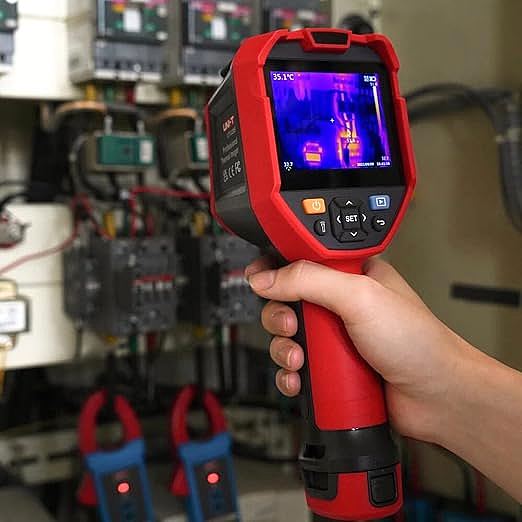
An infrared image is a map of heat, but it often lacks the familiar context of the visible world. Is that hot spot a faulty component, a reflection from an overhead light, or a coffee cup left on a machine? To solve this, a professional thermal imager is incomplete without a built-in visible light camera, like the 2-megapixel one found on the UTi260E. This enables several powerful imaging modes.
The most transformative of these is Image Fusion. This technology overlays key details from the visible image (like edges, labels, and textures) onto the thermal image. The result is a hybrid image that retains all the critical temperature data but is infused with real-world context, making it instantly understandable. You can immediately see that the hot spot is on terminal block ‘L3’, not ‘L2’. This dramatically speeds up diagnosis and makes creating clear, unambiguous reports for clients or colleagues effortless. Other modes like Picture-in-Picture (PIP) serve a similar purpose, embedding a thermal window within a full visual photo.
Furthermore, the ability to switch between different color palettes is not merely an aesthetic choice. Palettes like ‘Ironbow’ or ‘Lava’ are excellent for quickly spotting anomalies with their high-contrast gradients. In contrast, a ‘Rainbow’ palette can provide more granular detail within a wide temperature span, which is useful for detailed analysis. Understanding which palette to use for a given situation is a skill that enhances diagnostic efficiency.
From Data to Diagnosis: On-board Analysis and Workflow
Now that we can capture rich, context-aware images, the next step is to interrogate that data on the spot. A raw image is just a picture; it’s the on-board analysis tools that transform it into a powerful diagnostic instrument, allowing you to move from observation to actionable insight right in the field.
Modern imagers like the UTi260E come equipped with a suite of these tools. Automatic hot and cold spot tracking instantly flags the most extreme temperatures in the scene, saving you from having to manually hunt for them. You can add multiple spot meters or define areas (rectangles, circles) to get max, min, and average temperatures within specific zones. A particularly powerful feature is the Isotherm function. It allows you to set a temperature range (e.g., above 80°C) and the camera will highlight only the parts of the image that fall within that range. This is invaluable for quickly scanning large areas for components that exceed a predefined safety threshold, as specified by standards like those from NETA (InterNational Electrical Testing Association).
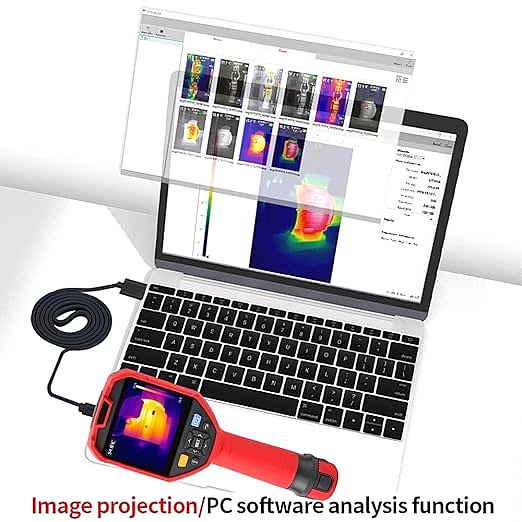
The workflow doesn’t end with the capture. A professional tool must seamlessly integrate into your reporting process. Features like Wi-Fi connectivity for quick image transfer to a mobile app and comprehensive PC software for detailed analysis and report generation are essential. Finally, the physical tool must survive the environment. An IP54 rating for dust and water resistance and a 2-meter drop-proof build mean the device is designed for the realities of an industrial site, not a pristine lab.
Building Your Decision Framework
Choosing the right imager is not about finding the one with the highest numbers, but about conducting a thorough needs assessment. The table below provides a framework for matching key specifications to common professional applications.
| Application Area | Most Critical Specification | Why It Matters | Recommended Spec Level (Guideline) |
|---|---|---|---|
| Electrical Inspection | Resolution | Needed to see and accurately measure small components (terminals, fuses) from a safe distance. | 160×120 (minimum), 256×192 (recommended), 320×240+ (for substations) |
| Building Diagnostics | Thermal Sensitivity (NETD) | Essential for detecting very subtle temperature patterns from moisture, air leaks, or insulation defects. | ≤80mK (good), ≤50mK (excellent) |
| HVAC & Plumbing | Temperature Range & Fusion | Needs to cover both cold (refrigerant lines) and hot (furnaces) systems. Fusion is key to tracing pipes/ducts in walls. | Wide Range (-20°C to 400°C+), Fusion is a must-have |
| Mechanical/PdM | Frame Rate & Analysis Software | A higher frame rate (≥25Hz) is needed to inspect rotating equipment. Software is key for trending temperatures over time. | ≥25Hz, Comprehensive analysis software |
Ultimately, the best camera is the one that reliably and accurately meets the demands of your specific job. Beyond the core specs discussed here, always consider the entire ecosystem: the intuitiveness of the user interface, the quality of the reporting software, and the availability of manufacturer support and calibration services.
Conclusion
An investment in a professional thermal imager is an investment in the power to see the invisible, to diagnose problems before they become catastrophic failures, and to operate with a higher degree of safety and efficiency. The specifications on a data sheet are not just numbers; they are a direct reflection of the tool’s ability to perform in the real world. By understanding that resolution dictates detail and measurement accuracy, NETD governs the ability to see subtle faults, and features like fusion and on-board analysis provide critical context and diagnostic power, you can look beyond the marketing and make a truly informed choice. This understanding is the first, and most crucial, step to unlocking the full potential of thermography in your profession.