Beyond the Spec Sheet: A Professional’s Field Guide to the Klein TI250

It often starts with a ghost. A homeowner complains of a perpetually cold room. An electrician chases an intermittent, phantom circuit trip. A maintenance manager tries to pinpoint a motor that “just sounds wrong” before it fails. These are the expensive, time-consuming problems that exist just beyond the reach of our normal senses. For years, the tool to see these ghosts—the thermal imaging camera—was a multi-thousand-dollar piece of equipment, reserved for specialists. Now, devices like the Klein Tools TI250 have crashed the party, asking a compelling question for every professional and serious DIYer: for around $300, can you buy a new sense, or are you just buying a new toy?
This is not a review that will simply list features. This is a field guide. Its purpose is to give you a practical framework to decide, definitively, if this specific class of tool belongs in your bag. We’ll move beyond the marketing copy and into the hard realities of fieldwork, answering the one question that matters: will it make your job easier, safer, and more profitable?
The Core Compromise: What 10,800 Pixels and 9Hz Really Mean in the Field
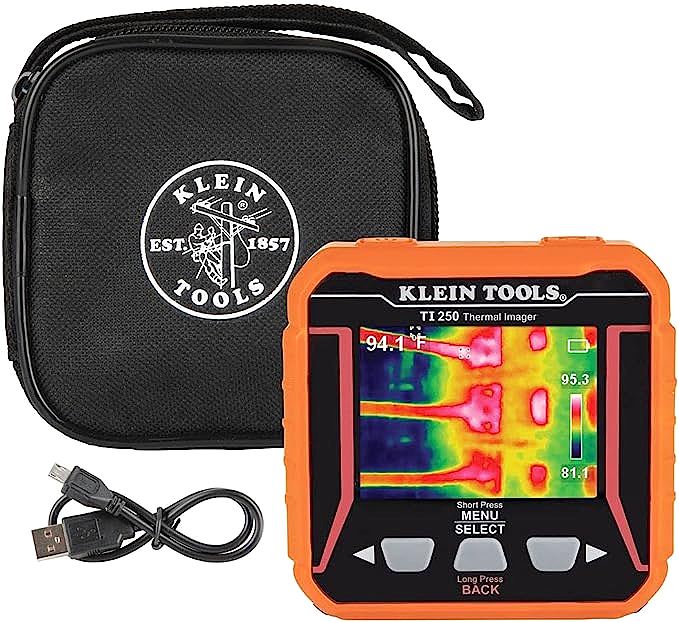
The first thing to understand about the TI250 is that it is a masterclass in purposeful compromise. The key to its accessible price lies in its core specifications, which are not weaknesses, but rather intelligent engineering choices designed to deliver maximum diagnostic value for the cost. The two most important numbers to understand are its sensor resolution of 10,800 pixels (formatted as 120×90) and its frame rate of 9 Hertz (Hz). To the uninitiated, these are abstract. To a professional, they define the precise boundaries of the tool’s utility.
The 120×90 resolution is not for creating gallery-worthy thermal portraits. Its job is not to show you the intricate heat signature of a bumblebee’s wings. Its job is to find anomalies. Think of it as a bloodhound’s nose, not a biologist’s microscope. In a complex electrical panel, this resolution is more than enough to make a dangerously hot 40-amp breaker scream in bright white against its cooler neighbors. It will instantly show you which of the six motors in a lineup is running 30 degrees hotter than the rest. What it won’t do is resolve the individual hot spot on a tiny surface-mount resistor on a crowded PCB. The TI250 is for finding the problem area, not for micro-level analysis.
Then there’s the 9Hz frame rate. When you pan the camera across a wall or a piece of machinery, the image won’t be buttery smooth. It will feel more like a slightly choppy video call from a weak Wi-Fi signal. This is a direct consequence of international export regulations and cost-saving engineering, and it’s the standard for most consumer-grade thermal imagers. For static inspections—the vast majority of diagnostic work—this is a non-issue. You point, you look, you analyze. But if you’re trying to track a rapidly moving heat source, the lag will be noticeable. It’s a trade-off you accept for the price.
Finally, as you use the device, you’ll hear a distinct ‘click’ and the image will freeze for a second. This is not a defect. It’s the camera’s shutter performing an automatic calibration, known as a Non-Uniformity Correction (NUC). This process is essential for all uncooled microbolometer sensors (the technology at the heart of the TI250) to maintain thermal accuracy by adjusting for the sensor’s own internal temperature drift. Understanding these three elements—resolution for anomaly detection, a modest frame rate for affordability, and auto-calibration for accuracy—is the first step to using the tool like a pro.
Where Pixels Meet Paycheck: Three Scenarios, One Tool
So we’ve talked about the technical trade-offs on paper. But how do these limitations—and strengths—actually play out when you’re on a job, with a client waiting? Let’s step into the boots of three different professionals and see the TI250 in action.
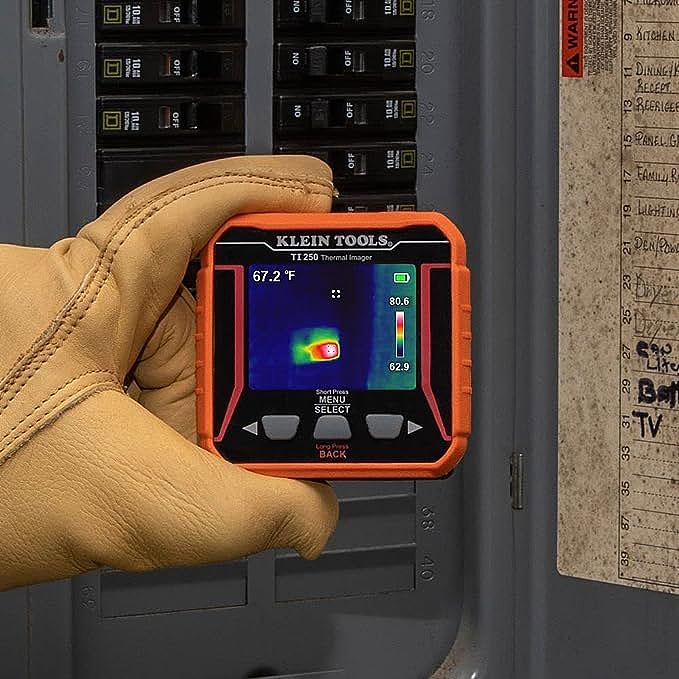
For the Electrician: You’re called to a commercial kitchen to investigate a breaker that trips randomly. The panel has 42 circuits, and the trip seems to happen under load, but not consistently. The old method? A tedious process of elimination with a clamp meter. The new method? You scan the entire panel with the TI250. Instantly, you see it: one neutral wire connection is glowing significantly hotter than the others, a classic sign of a loose or failing termination. As one long-term user noted in a review, “I used it to find a loose neutral that was causing flickering lights… a problem that had eluded two other electricians.” You didn’t need 4K resolution to see it; you just needed to see the heat. This is where the TI250 shines: turning hours of guesswork into minutes of targeted repair, all while maintaining a safe, non-contact distance from live components.
For the HVAC Technician: It’s a sweltering summer day, and a customer is complaining that one room is never cool enough. You suspect leaky ductwork in the attic. Instead of crawling through insulation for an hour, you pop your head up and scan the ducts with the TI250. The cool, dark blue of a properly sealed duct is immediately contrasted by a plume of bright yellow—cold air spilling into the hot attic. The camera’s wide 50-degree Field of View (FOV) is a huge advantage here, allowing you to see large sections of ductwork at once in a cramped space. You can pinpoint leaks, check condenser coil function, and identify insulation gaps in walls, providing your client with visual proof of the problem and the solution.
For the Home Inspector & Remodeler: A potential home buyer is concerned about a musty smell in the basement. You scan the finished drywall with the TI250. While most of the wall is a uniform color, one section near the floor shows a distinct, colder blue pattern. This doesn’t confirm a leak, but it tells you exactly where to place your moisture meter. This ability to quickly survey large areas for thermal anomalies is invaluable for energy audits and pre-remodeling inspections, aligning with professional standards like those outlined by the U.S. Department of Energy for building envelope diagnostics. You’re not guessing where the problem is; you’re following a thermal map directly to it.
The Art of Seeing Accurately: Why Ignoring Emissivity Makes Your Imager Useless
Finding a hot spot is one thing, but trusting the temperature number on the screen is another. Many new users get frustrated by inaccurate readings, blaming the tool. But the problem isn’t the camera; it’s a single, misunderstood setting that separates a novice from a pro: emissivity.
In simple terms, emissivity is a measure of a surface’s ability to emit thermal energy, on a scale from 0 to 1. A perfect blackbody (like the carbon in a candle flame) has an emissivity of 1.0, meaning it’s a perfect emitter. A shiny, reflective surface like polished aluminum might have an emissivity of 0.05, meaning it’s a terrible emitter and a great reflector.
Here’s why this matters: your thermal camera doesn’t measure temperature directly. It measures infrared radiation and calculates temperature based on the emissivity value you’ve set. If you leave the camera on its default setting (usually 0.95, for common non-metallic surfaces) and point it at a shiny copper busbar (emissivity ~0.04), the camera will give you a wildly incorrect, dangerously low temperature reading. It’s not seeing the heat the copper is emitting; it’s seeing the reflected heat of your own face.
This sounds complicated, but the professional workaround is brilliantly simple. Carry a small roll of black electrical tape. If you need an accurate reading on a reflective surface, stick a small piece of the tape on it. Wait a moment for the tape’s temperature to equalize with the surface, then point your camera at the tape. Since electrical tape has a known high emissivity (~0.95), you’ll get a temperature reading that is far more accurate. Mastering this one technique elevates the TI250 from a simple heat detector to a genuinely useful diagnostic tool.
The Decision Framework: Is the TI250 Right for You?
So, does the Klein TI250 belong in your toolbox? Let’s bypass a simple “yes” or “no” and use a framework to find the right answer for your specific needs. Ask yourself these questions:
- Is my primary goal detection or metrology? Am I trying to quickly find the one hot breaker in a panel of forty (Detection), or do I need to measure the precise temperature of a specific component from 10 feet away and include that measurement in a formal report for an insurance company (Metrology)? The TI250 is a champion of detection. For high-stakes metrology, you need more pixels and better thermal sensitivity.
-
What is my typical working distance? Are you usually working within a few feet of your target, like inside a residential electrical panel or looking at an engine? Or are you on the ground trying to inspect a connection on a utility pole 30 feet up? The TI250’s resolution is best suited for close- to mid-range work.
-
Do my reports require high-resolution images? If your deliverables to clients or managers require detailed thermal images where they can clearly see the context and the specific component, the 120×90 resolution might not suffice. You may need to look at higher-end models that feature technologies like FLIR’s MSX, which overlays a visible light image onto the thermal one for clarity.
If your answers lean towards detection, close-range work, and internal diagnostics, then the Klein TI250 doesn’t just make sense—it represents an almost unbeatable return on investment. It’s a tool that pays for itself the first time it turns a full day of troubleshooting into a 30-minute fix. It is not a thermal microscope, nor is it a high-definition thermal camera. Think of it as the ultimate “thermal listening device”—an affordable, rugged, and profoundly useful new sense that lets you hear the silent warnings of heat before they become catastrophic failures.